Skip to content

Architecture Overview

devhome

devhome's compute, storage, and Kubernetes footprint all live on-prem, reachable through a single UniFi core switch (Office-Aggregation) trunking one native LAN and two tagged VLANs down from pfSense: LAN (10.10.10.0/24, clients), VLAN 20 (10.10.20.0/24, management/storage), and VLAN 30 (10.10.30.0/24, VM workloads).
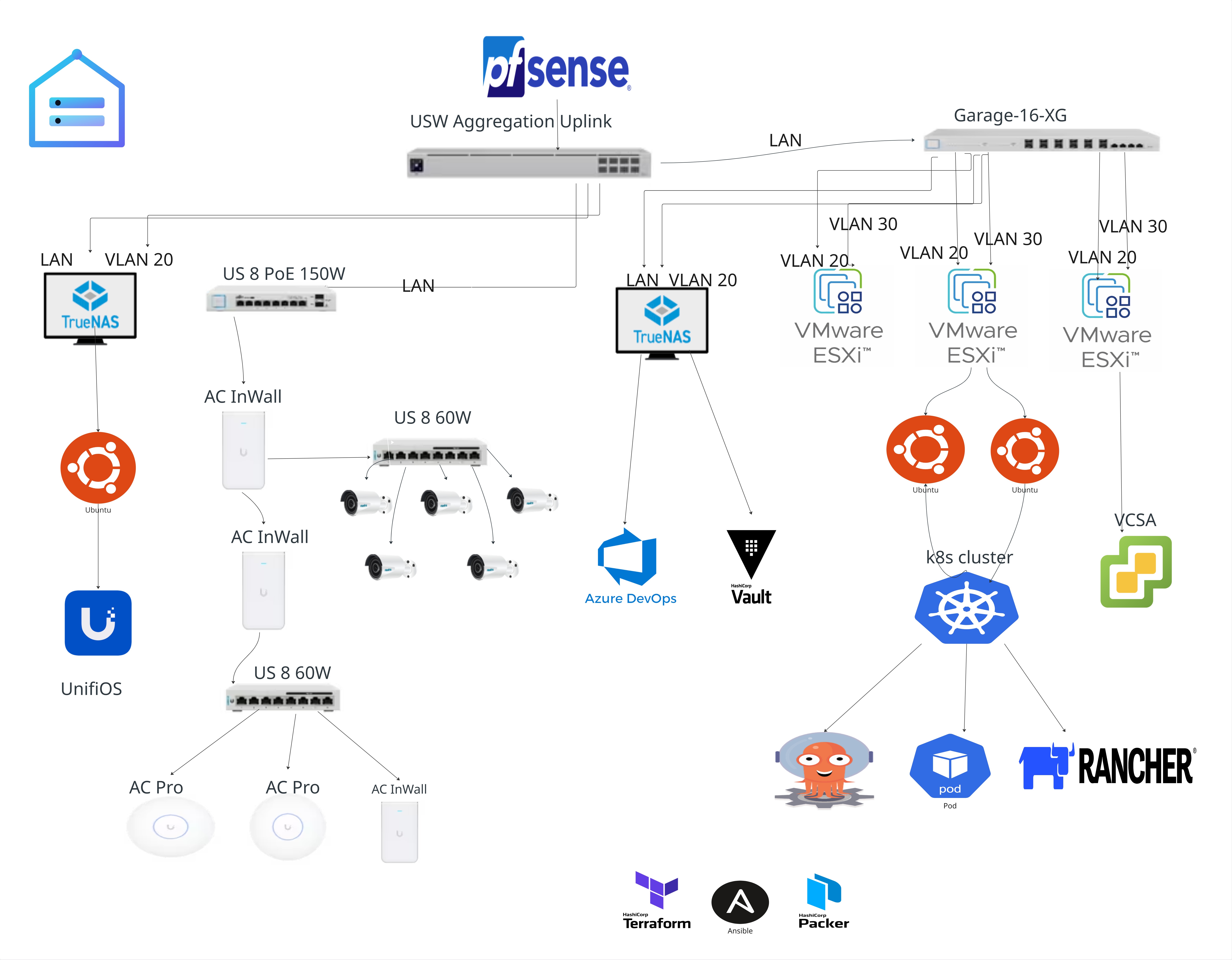
Architecture overview diagram

Why a static image, not a live Mermaid diagram

This was originally a live mermaid code block. Mermaid renders diagrams client-side in JavaScript on every page navigation, and this diagram's node count made its layout algorithm genuinely slow — a real multi-second stall on every visit to this page, confirmed by server logs staying clean (rt=0.000, zero errors) throughout. Pre-rendered once at build time instead (@mermaid-js/mermaid-cli, dark theme, #0d1117 background to match the rest of the site) so every visitor gets an instant static image instead of paying that render cost live. The source is docs/assets/architecture-overview.mmd if this needs to be regenerated after an edit:

npx @mermaid-js/mermaid-cli -i architecture-overview.mmd -o architecture-overview.svg -b '#0d1117' -t dark
mermaid-cli always emits the root <svg> with width="100%" and no height attribute. That's fine for a live-rendered inline diagram, but this file is loaded as a plain <img> (both by the page itself and by the glightbox lightbox), and a percentage width gives the browser no intrinsic size to size an <img> or lightbox against — it silently falls back to a tiny default box. Every regeneration needs this follow-up to swap that for the real pixel dimensions from its own viewBox:
# read the viewBox printed by the command above, e.g. "0 0 3247.46 1817"
sed -i 's/<svg id="my-svg" width="100%"/<svg id="my-svg" width="3247.46" height="1817"/' architecture-overview.svg

The two clusters that matter operationally

  • dke-mgmt — the always-on management cluster. Runs ArgoCD and Rancher, which register and manage every other cluster. If this cluster is down, nothing else can be deployed or synced (but workload clusters keep running — GitOps is pull-based).
  • dke-* workload clusters — provisioned by Terraform (terraform/vsphere/modules/k8s) using kubeadm, then registered into ArgoCD/Rancher/Vault automatically. See Bootstrapping a New Cluster.

Design principles worth calling out

  • Everything is provisioned, nothing is clicked. Terraform owns hosts/clusters/VMs, Packer owns golden images, Ansible owns day-2 configuration, ArgoCD owns what runs inside clusters.
  • Secrets live in Vault, never in git. This repo replaced a previous one that had to be abandoned specifically because secrets were committed to git history — see Vault Overview.
  • DHCP over static reservations, by default. Most lab nodes get DHCP leases with no reservation, which is fine in steady state but has bitten the management cluster more than once during network churn — see Kubernetes Troubleshooting.
  • Floating VIPs over pinned IPs, going forward. The kube-vip design (terraform/vsphere/modules/k8s) decouples a cluster's API endpoint from any single node's IP using BGP-advertised addresses, the same mechanism Calico already uses for LoadBalancer IPs. New clusters get this from day one; dke-mgmt gets it when rebuilt.

See Network Design for VLAN layout and Compute & Storage for the ESXi/datastore layout.